Remote device & job listener
Remote device is an opt-in Team-edition feature that lets another device run AI jobs on your behalf. You dispatch an evaluate / plan / chat job from one device; an approved device on the same team claims it, runs the agent locally, and writes the result back. The job runs on the device with the codebase, not in the cloud — so the agent has real file access, real worktrees, real dev servers.
Why it exists
Web-only AI agents can't read your local code. Local agents can. If you're browsing the pool from a phone or a second laptop without the codebase, you can't trigger meaningful agent work on a card — unless the work runs on the device that does have the codebase.
Remote device closes the loop: the web board dispatches a job, your desktop running Ideafy picks it up, runs the agent, and the results sync back.
The players
- Desktop device: your main machine with Ideafy installed, the codebase, the agent CLI. Runs the job listener as part of the Ideafy app
- Web board / second device: where you dispatch jobs. Doesn't need the codebase; only needs to be signed in to the team
- Supabase: the messaging layer. Jobs live in the
ai_jobstable
Registration flow
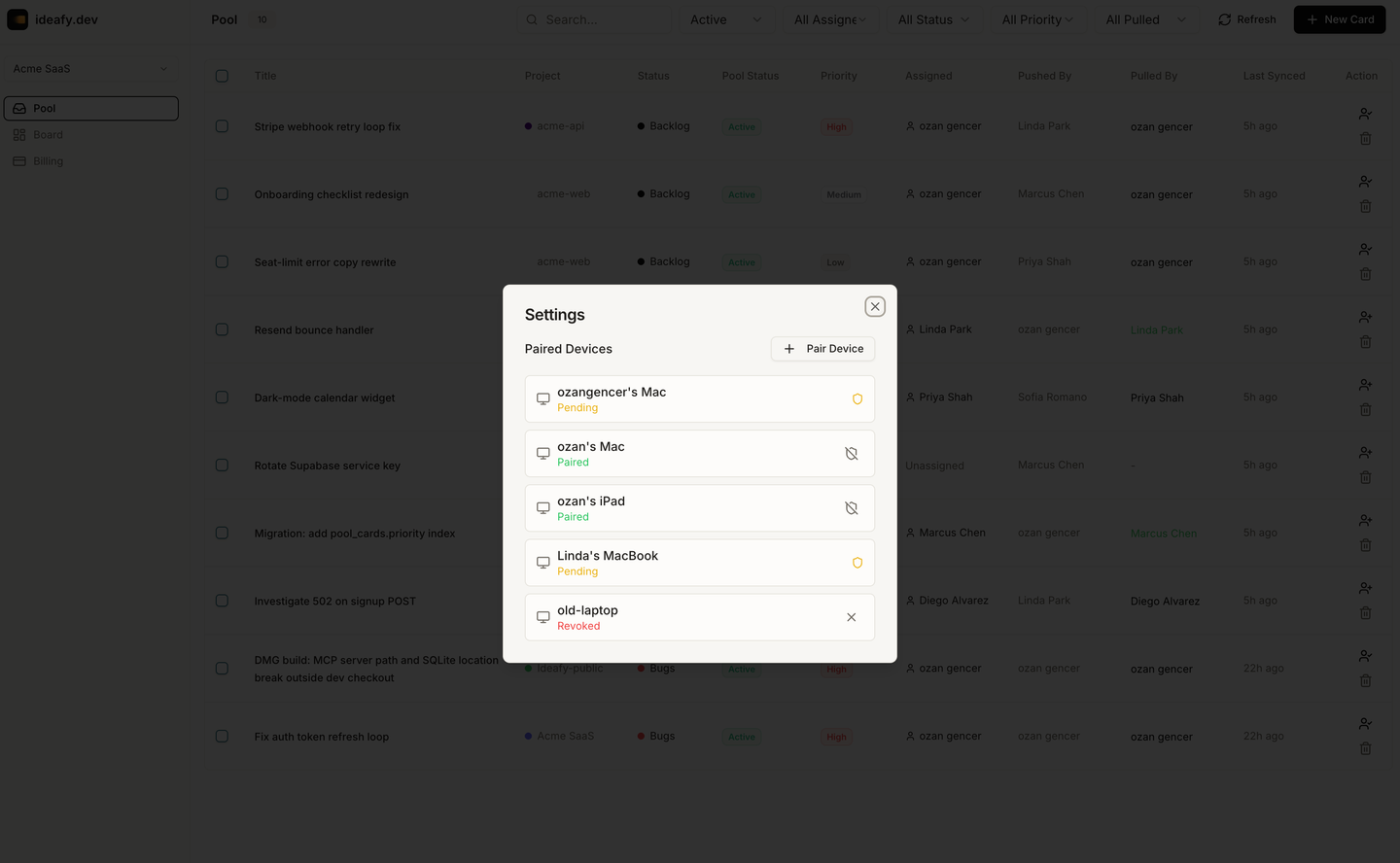
- Your desktop Ideafy generates a device ID (UUID) and a device name (e.g., "ozan's Mac")
- On first run, the device shows a 6-digit pairing code in Settings → Devices
- An admin (or you) approves the device in the team's device list, either by entering the code or by clicking an approval button next to the device row
- Once approved, the device status in Supabase
devicestable becomesapproved - The desktop starts sending heartbeats to
agent_heartbeatsevery 30 seconds, and subscribes toai_jobsRealtime for newpendingjobs
Dispatching a job
- From the web board (or any second-device context) open a pool card
- Click Evaluate / Plan / Chat — whichever AI action you want
- The API inserts a row into
ai_jobswithstatus = pending,team_id,card_id, andjob_type - Any approved device in the team subscribed to that job type sees the insert via Realtime
Claiming & running
The first approved device that sees the pending job tries to claim it atomically:
- Update
ai_jobssetstatus = running,claimed_by = userId,claimed_device_id = deviceIdwherestatus = pending - If the update affects a row, the device wins the claim and runs the job
- If another device won first, the local attempt is a no-op
Running the job on the device means: spawning the agent CLI with the right card context, letting the agent read the codebase and call MCP tools, and writing the results back to Supabase. It takes minutes, not seconds.
When the job finishes (success or failure), ai_jobs.status becomes completed or failed. The dispatcher can see the result from the web board.
Job types
- plan → runs
save_planworkflow - chat → runs a single chat turn on a card's section
- evaluate → runs the evaluate processing type
Autonomous and quick-fix aren't dispatched remotely today — they're long-running and the orchestration gets tricky. Plan / chat / evaluate cover the fast, high-value operations.
When to use it
- You're on your laptop away from your desktop and want to kick off an evaluate on an idea that just occurred to you. Your desktop, left running, picks it up
- Your team lead wants an AI opinion on a backlog card and triggers it from the pool view; whichever teammate is online catches the job
- You want to run evaluate in a batch overnight, on your main machine, but you don't want to sit at the desktop. Dispatch from the web, let the listener handle them
When not to use it
- If you're in front of your main machine, just run the agent directly. Remote device adds round-trip latency for no benefit
- If the desktop device is offline, jobs stay
pendinguntil someone else's device picks them up (or never, if nobody's online). There's no retry from the cloud
Revoking a device
Settings → Team → Devices → remove device. The device's status becomes revoked; it stops receiving jobs immediately. Heartbeats from the revoked device are ignored.
Prev: Notifications Next: Plans & pricing Up: User guide index