Card modal — Tests
Tests is the tab where a card says how you'll know it's done. Concrete, checkable acceptance criteria — not unit test code. The tab is driven by the save_tests MCP tool and backed by a Tiptap task list, so every criterion is a checkbox you can tick by hand.
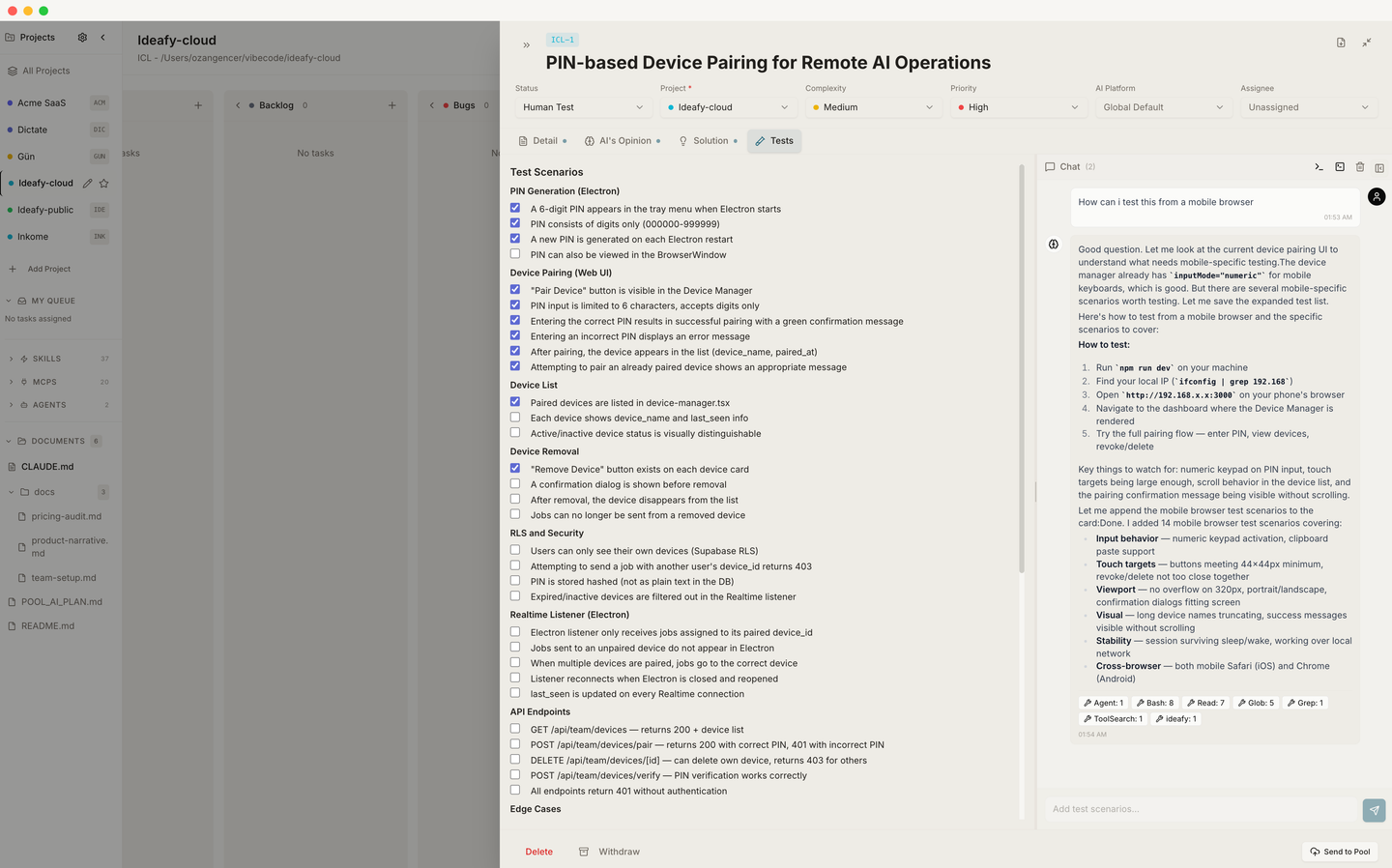
When save_tests runs, it:
- Converts the AI's markdown checklist into Tiptap
TaskListHTML - Writes it to
testScenarios - Moves the card to Human Test
A card in Human Test means: "implementation is done; somebody needs to click through this list."
The core flow
Every generated checklist opens with one group — ## Core flow on an English card, ## Temel akış on a Turkish one — capped at five items. If those pass, the feature fundamentally works. Everything after that group is optional and exists only to catch what the core flow cannot.
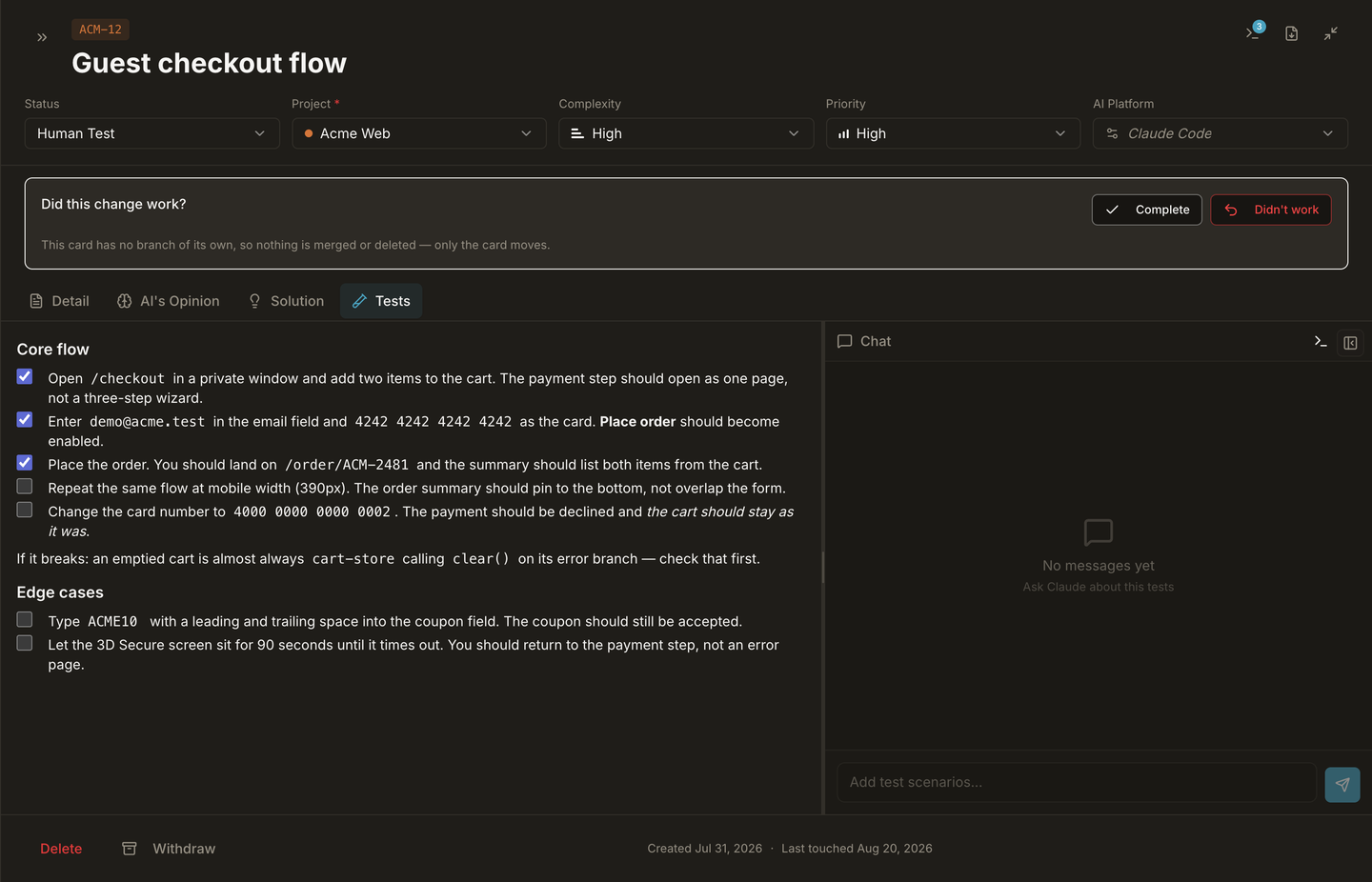
The failure mode this targets is volume. A card reading 1/46 looks like a day of work when the part that matters is five steps long — and a checklist that reads as work to postpone never gets run. A list past ~12 items is a signal that the card is too big, not that the agent was thorough.
The heading is load-bearing, not decoration. The card face and the Focus view read it to count the core group separately:
| Checklist state | Card reads |
|---|---|
| Core group present, 3 of 5 ticked | 3/5 core ✓ · 2 left for you |
| Core group done, 4 optional items left | core flow done · 4 optional left |
| No core heading (written before the contract) | falls back to the flat count, 12/46 checked |
That fallback is deliberate. Without the heading there's no way to tell which items are essential, and guessing would be worse than a flat number.
Real data, not placeholders
The same contract rejects steps you can't run without going to look something up:
- "Open card IDE-282" beats "open a card"
- "Its session is
83e1174a…, idle since yesterday" beats "pick a session" - When step order matters, the reason goes on the same line — "not IDE-283 — that session is live right now and would conflict"
- A group may close with one
If it breaks:line naming the first place to look
Rejected outright: spec-style assertions (Dropdown shows None + all teams), implementation claims (mergeTestCheckState preserves checked state), and anything unobservable (Works correctly).
One contract, every entry point
The style rules live in a single module (lib/prompts/test-style.ts) that every AI surface injects: the Tests-tab chat, the terminal Test Together and Generate Tests flows, autonomous and quick-fix runs, and the save_tests MCP tool description. The MCP server is a separate package, so a build step copies the module verbatim rather than letting the two drift.
The practical effect: a checklist written by the agent in a terminal reads the same as one written from the chat panel.
The agent can pre-walk the core flow
A card sitting in Human Test that gets an autonomous run does not rewrite the checklist. It walks the core-flow group, ticks only what it actually exercised, and hands back the entire list otherwise untouched — every group, every item, original order and wording. Later groups come back exactly as they were.
What reaches you is the handful of steps a machine could not settle, plus one line naming what blocked any core item it left unticked. See the verify phase.
This tab is not only for developers
Read this section first if you thought "Tests" was a developer-only tab. It isn't.
A card in Human Test is a card that needs a second pair of eyes — and that second pair of eyes doesn't have to belong to somebody who can read code. Ideafy deliberately designs the Tests tab so that a business analyst, a product owner, a QA lead, or even the founder can drive a card through the rest of the chain without writing a single line themselves.
Here's the mental model. There are two layers on every Tests page:
- The checkbox list — human-readable acceptance criteria, plain English. "The sign-up form rejects emails without an @ sign." "Clicking Upgrade opens Stripe in a new tab." "The trial countdown shows the right number of days left."
- The chat panel — a direct line to Claude Code (or Gemini / Codex) that can run code, write code, commit, push, and update the checkboxes on your behalf.
You don't need to know the difference between a branch and a merge. You need to know whether the behaviour matches what you wanted — and the chat panel is the interface for saying "this is wrong, fix it" and getting a fix committed without ever opening an IDE.
What the chat panel can actually do
When you're sitting on the Tests tab and you type in the chat panel, the agent has the full Ideafy MCP surface plus the filesystem and terminal of the card's worktree. That means it can:
- Read and write source files in the worktree
- Run the test suite (
npm test,pytest,cargo test, whatever the project uses) and read the output - Start or stop the dev server on the worktree's allocated port
- Open a browser through an adjacent skill (e.g., the
claude-in-chromeorchrome-devtoolsskills) to click through the UI on your behalf — so you can say "try signing up with an invalid email and tell me what happens" - Check
git status, stage files, commit, and push the branch - Call
save_testsagain to rewrite the acceptance criteria when the scope shifts - Call
save_planif it needs to revise the implementation plan while you're watching - Move the card between columns via
move_card
In plain English: anything a developer could do at a terminal, the chat panel can do in conversation. The difference is you're telling it what you want in business language, and it's translating that into code, commits, and test runs.
Elevated permissions, automatically
By default Claude Code asks for confirmation before every destructive action — edit a file, run a shell command, create a commit. That's the right default when you're pair-programming. It's the wrong default when you're a product owner who just wants the bug fixed and committed while you watch.
Ideafy handles this for you. When you're in the Tests tab and the card is in In Progress, Human Test, or Completed, the chat panel automatically passes --dangerously-skip-permissions to the agent. You don't toggle it. You don't enable it. It's a framework-level rule based on where you are and what state the card is in:
- Tab = Tests, AND
- Card status ∈ {
progress,test,completed} - → the session runs with elevated permissions
On any other tab (Detail, Opinion, Solution) or any earlier card state, the default confirmation flow applies — because planning and design benefit from friction, and verification benefits from speed.
With elevated permissions on, a single chat message on the Tests tab can:
- Run the failing test
- Identify the broken behaviour
- Edit the source file
- Re-run the test
- Commit the fix with a reasonable message
- Push to the branch
- Call
save_testsagain to refresh the checkbox list
…in one conversation, without fifteen "allow" clicks. You read the streamed output, decide whether you're happy, and tick the box.
Why it's safe. Each card's work happens in its own
.worktrees/kanban/[PRJ-N-...]directory on its own branch. An agent running with skip-permissions inside that worktree can't touch your main branch or any other card's work. If the run goes sideways, you Rollback the card and the whole worktree disappears cleanly. The elevation is scoped to the card's sandbox, not to the filesystem.Autonomous runs everywhere. Autonomous mode (not chat — the "Run autonomous" button) also uses
--dangerously-skip-permissionsregardless of tab or status. Interactive chat on non-Tests tabs is the conservative mode; autonomous and Tests chat are the fast modes.
See Interactive CLI sessions for the full permission-flag matrix across every mode.
A non-technical workflow, end to end
This is what a Tests-tab session looks like for someone who doesn't write code.
- A card lands in Human Test. Implementation is done; the checkbox list is populated. You open the card
- You walk the list. Start the dev server from the modal header (one button), open the URL, exercise each acceptance criterion, tick the boxes that pass
- Something fails. Maybe the sign-up form accepts an invalid email. You open the Tests-tab chat panel and type: "When I enter 'foo' without an @ sign, the form accepts it and takes me to /onboarding. It should show an inline error instead."
- The agent gets to work. Reads the form component, identifies the missing validation, writes the fix, runs whatever tests exist, commits with a message like "add email format validation on sign-up"
- You re-test. Re-try the broken scenario. Tick the box when it passes
- You're done. Click Merge from the card modal header. Ideafy rebases onto main, merges, cleans up the worktree, and the card moves to Completed
Nowhere in that loop did you need to open a code editor. You needed to know what the product should do (you already do — that's your job) and how to describe failure clearly (also your job).
How the Tests tab changes the team shape
Giving non-developers the ability to drive a card from Human Test to Completed changes what a team can look like:
- Product owners can close their own bugs instead of writing tickets
- Business analysts can turn acceptance criteria into shipped behaviour without a developer in the loop
- QA leads can actually fix the thing they just found
- Founders can keep shipping small improvements on evenings and weekends without blocking on engineering
The developers are still there. They own Ideation through In Progress — the parts of the chain where an architectural decision matters. But the handoff from "implementation done" to "shipped and verified" can safely belong to someone who speaks the product's language, not the codebase's.
Who ticks the boxes, and when
Once a card is in Human Test, a Claude Code session bound to it runs on a policy written specifically for this column. The short version: the agent ticks boxes on its own, and asks you only about closing the card.
That split is deliberate. In every other column there's one save at the end of the phase, and the agent has to ask before making it. In testing, recording a result is the work — it happens many times per session — so making each tick wait for a "yes" would be noise.
| What the agent does | Asks first? |
|---|---|
Verifies a scenario, marks it [x], calls save_tests | No |
Reports a scenario it couldn't verify, leaves it [ ] | No |
| Moves the card to Completed once everything is checked | Yes — once, in one short sentence |
Three rules keep this honest:
- It never checks a box it didn't observe. A scenario that needs a person, or access the agent doesn't have, or that outright failed, stays
[ ]and gets said out loud. A failing scenario is never quietly skipped. - It sends the full checklist every time — every existing item with its current state, changing only what it just verified.
- "No" means "not yet". If you decline the move to Completed, it keeps working and doesn't re-ask on turns where nothing new was verified.
See the Human Test policy for the exact instruction block the agent receives.
Removing scenarios you didn't ask for
save_tests is append-only by default: every checklist item that already exists has to survive the payload, or the call is refused. That guard exists because the model rewrites the whole list on each call and used to drop items silently.
But absolute append-only also closed the only door back out of a bad suggestion. Asking the assistant to remove three scenarios it had just invented did nothing — it would try, get refused, and the items would stay.
So save_tests takes an opt-in allowDeletion flag. With it, the payload becomes a literal replacement of the checklist: the append-only check, the checked-item check and the check-state merge are all skipped, so every surviving item has to be sent back verbatim, [x]/[ ] state included. The response reports how many scenarios the write removed.
You don't set this flag — the agent does, and only on a turn where you explicitly asked for a removal. In practice you just say "drop the last three scenarios, I didn't ask for those" and it works.
Two things stay true either way:
- A payload with no checkboxes at all is refused, flag or not. That's a formatting mistake rather than a deletion. To clear the list completely, delete the items yourself in the Tests tab.
- Without the flag, nothing changes — ordinary appends behave exactly as before.
Why the chat converses instead of writing
There's a related trap worth knowing about. Writing via save_tests hides the Append / Replace buttons in the chat UI — the one place where you can overwrite the checklist yourself. The prompt used to tell the model to persist on every substantive turn, which meant ordinary conversation kept landing on the card and quietly removed your own escape hatch.
The Tests section now has its own persistence rule: converse by default, propose scenarios as markdown so Apply decides, and call save_tests only when asked (or when a scenario's result becomes known during testing, per the policy above). Answers stay scoped to the question instead of regenerating the whole checklist every turn.
Checkbox state is preserved across updates
This is a subtle but important behaviour. If the AI regenerates tests by calling save_tests a second time — for example, after scope changed during implementation, or after the chat panel fixed a bug and added a regression test — Ideafy doesn't wipe the checks you already ticked.
The merge works like this:
- Before replacing
testScenarios, Ideafy parses the existing HTML to extractdata-checkedstate per task - The new HTML is rendered
- For every task in the new list whose text matches a task from the old list, the old checked state is applied
- New tasks (no text match) start unchecked
So the workflow "AI writes tests → you tick three of five → AI updates tests → you keep your three ticks on the matching items" just works. No diff review, no manual bookkeeping. This is what makes iterative verification safe — you can ask the agent to revise scope mid-review and not lose your work.
Format
A good Tests page is a capped core group, then whatever else genuinely earns a line. Nesting works but usually hurts readability:
## Core flow
- [ ] Sign up with Google from /signup. A user row is created and you land on /onboarding.
- [ ] Sign up with an expired magic link. The "link expired" state shows instead of a redirect.
- [ ] Reload — the sidebar shows the new user's avatar and name.

If it breaks: check the callback route's redirect target before anything else.

## Edge cases
- [ ] Six sign-up attempts in a minute. The sixth returns 429 rather than a new user.
Each item is a thing you can verify by doing. If you can't check it with a click or a one-line experiment, it probably belongs in Solution instead.
Editing by hand
You can add, delete, or rewrite tests directly in the editor. You can also tick and untick boxes. Both edits persist immediately.
From the chat panel
The Tests tab's chat panel is the place to:
- Ask the agent for more tests ("what edge cases am I missing?")
- Refine existing ones ("rewrite these in terms of user actions, not API calls")
- Report a failing case ("step 3 doesn't work — form submits without validation")
- Ask for a fix ("this is broken, please fix it and commit")
- Run the test suite and report the result ("run the tests and tell me which ones fail")
- Commit and push the current state ("everything looks good, commit as 'fix: email validation' and push")
When the agent calls save_tests, the tab updates and your existing check state is preserved.
The implicit column move
Because save_tests moves the card to Human Test, you generally only want to call it when implementation is actually done. If you want a pre-emptive test list during planning, either let the AI write them inline in Solution, or call save_tests on a card that's already in Human Test (the column move is a no-op then).
Prev: Card modal — Solution Next: Card chat & mentions Up: User guide index