Interactive CLI sessions
Ideafy has two ways of running an AI agent: autonomous (fire and walk away) and interactive (you and the agent in a running conversation). This page is about the interactive side — how sessions persist, how you pop them out into a real terminal, and which permission flags Ideafy sets automatically for each phase of a card.
Interactive sessions are the mode most people spend the most time in once they're comfortable with Ideafy. Autonomous is powerful for repetitive work; interactive is where thinking out loud with the agent happens.
Resume — the chat panel never forgets
Every chat panel in every tab of every card is backed by a persistent CLI session.
Behind the scenes, Ideafy keeps a chatSessions table that maps (cardId, sectionType) → cliSessionId. On your first message in a tab, a fresh session is spawned and its ID is stored. On every subsequent message in the same tab, Ideafy spawns the agent with:
claude --resume <sessionId>
…and passes only your new message. No system prompt re-send, no history replay, no re-reading the card from scratch. The CLI picks up its own state and keeps going.
What this means in practice:
- The chat feels continuous across days. You can open a card you last touched a week ago, type one more follow-up, and the agent already knows the full context. It's not re-reading anything — it's the same session
- Per-tab scoping is real. Each tab (
detail,opinion,solution,tests) has its own session ID, so switching tabs actually switches threads. The agent on Solution doesn't know what you said on Tests - Resume is provider-dependent. Claude Code supports
--resumenatively and that's the primary supported path. Gemini and Codex behave differently; if you switch the card'saiPlatform, the session may not resume cleanly and Ideafy will start a fresh one
You don't have to do anything to opt into this. It just works.
Open in Terminal — pop the session into iTerm
Sometimes you want to leave the card modal and talk to the agent in a real terminal — typically when you're about to do heavy pair-programming and want tab completion, editor integration, and the full Claude Code TUI.
Click Open in Terminal in the card modal header. Ideafy:
- Detects the phase of the card (planning / implementation / retest) from its fields
- Creates or reuses the git worktree at
.worktrees/kanban/[PRJ-N-...]if the card is in the implementation phase - Builds the command via the provider layer (
buildInteractiveCommand) — the Claude version looks roughly like:cd "<worktree>" && IDEAFY_CARD_ID="<cardId>" claude '<prompt>' [--permission-mode plan] - Launches the command in your preferred terminal — iTerm2, Ghostty, or Terminal.app — via the
terminalAppsetting
The spawned Claude session has the IDEAFY_CARD_ID environment variable set, which fires the UserPromptSubmit hook (see Bundled Claude Code hooks) — so the agent in the terminal automatically knows "I'm working on card KAN-14, and I should call save_plan / save_tests / save_opinion when I'm done." You can walk away from the card modal entirely and still have the workflow anchored to the right card.
Plan mode — for the planning phase
Claude Code supports plan mode, where the agent drafts a plan first and asks for your approval before executing. It's the right mode when you're still figuring out how to do the work.
Ideafy enables plan mode automatically when you Open in Terminal on a card in the planning phase. The command line picks up --permission-mode plan, and Claude Code boots into its plan UI — show draft, wait for confirmation, execute only after you're happy.
Once the card has moved past planning (for example, save_plan has been called and the card is in In Progress), plan mode is no longer forced. Subsequent Open in Terminal sessions run in normal mode, because the plan already exists and the point of the session is to build what's in it.
If you want plan mode on a card that isn't in the planning phase, you can always invoke Claude manually with --permission-mode plan in the worktree directory — Ideafy just automates the common case.
Test mode — auto-elevated permissions
When you're on the Tests tab of a card whose status is In Progress, Human Test, or Completed, Ideafy automatically passes --dangerously-skip-permissions to the agent in the chat panel.
This is deliberate and it's not a toggle — it's a rule:
- Tab = Tests, AND
- Card status ∈ {
progress,test,completed} - → chat panel sessions run with elevated permissions
Why? Because the Tests tab is the verification and fix-it-now surface. When a non-developer is driving a card through Human Test (see Tests tab), every "fix this and commit it" has to translate into file edits and git commands without fifteen confirmation prompts. Forcing skip-permissions at the framework level means the product owner or business analyst doesn't even have to know the flag exists.
Outside the Tests tab, or on cards earlier than In Progress, the flag is not set — chat panel sessions run with Claude's default confirmation flow, which is the right default for planning and design work where you want more friction.
Worktree isolation is what makes this safe. The agent is running inside a card-specific worktree (.worktrees/kanban/[PRJ-N-...]) with its own branch. Skip-permissions in that sandbox means "don't ask before editing files on this branch" — it cannot touch main, it cannot touch other cards' worktrees, and a bad run is recoverable via Rollback.
Autonomous — always elevated, never resumes
For completeness: autonomous mode (see Autonomous vs quick-fix processing) always runs with --dangerously-skip-permissions and never resumes a previous session. Every autonomous run is a fresh CLI invocation with the full system prompt, because the point of autonomous is to be reproducible and un-stateful. The trade-off: autonomous forgets; interactive chat remembers.
Resume in Terminal — continue a chat session in iTerm
If you've been chatting with the agent in the card modal and you want to pick up exactly that conversation in a real terminal (for example, to use editor shortcuts for a big refactor), click Resume in Terminal — a secondary action alongside Open in Terminal.
Under the hood, Ideafy:
- Looks up the
chatSessionsrow for the current(cardId, sectionType) - Reads the stored
cliSessionId - Builds:
cd "<worktree>" && claude --resume "<sessionId>" - Opens the command in your preferred terminal
The terminal session shares the same underlying CLI state as the chat panel. You can alternate between the modal chat and the terminal for the same card — both are just different front-ends to the same resumable session.
The card's session list
Resume-in-Terminal above resumes one session — the one belonging to the tab you're on. But a card usually accumulates several: one per chat tab, plus every session you started yourself in a plain terminal and bound to the card. Until recently those terminal-born sessions were invisible in the UI even though their IDs were sitting in the database.
The terminal icon in the card modal header opens CLI Sessions: every session recorded against the card, newest first.
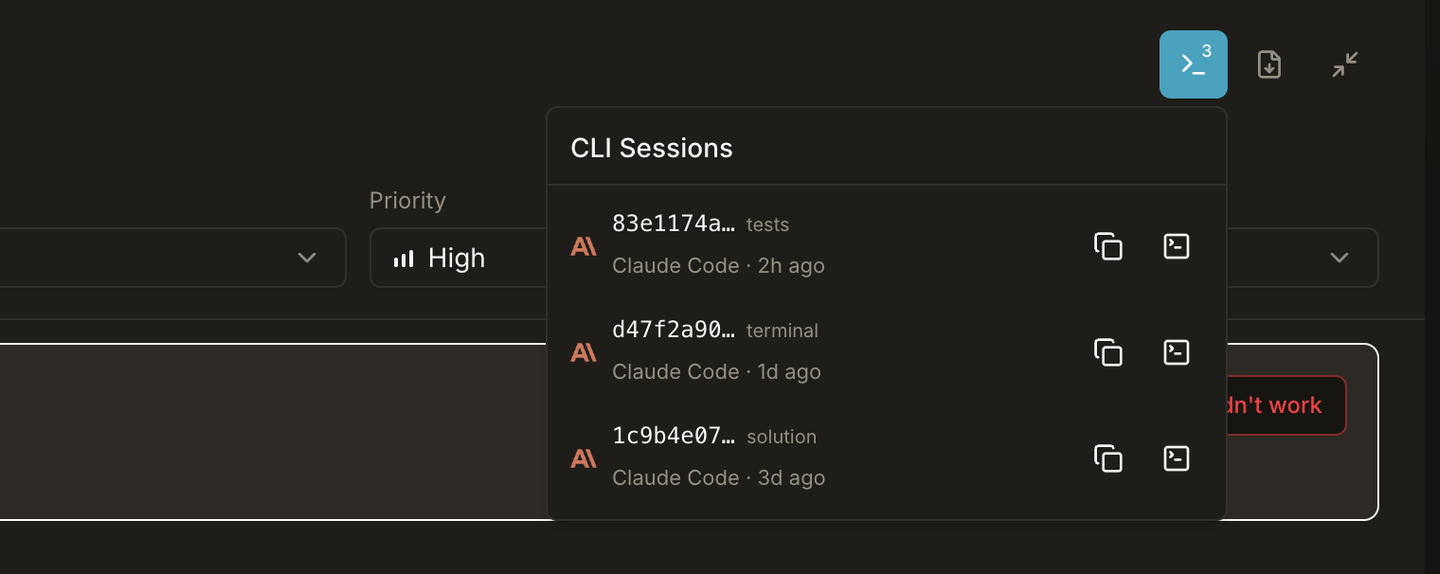
Each row shows the provider icon, a shortened session ID (83e1174a…), where it came from, and when it was last used:
| Source | Label | Recorded by |
|---|---|---|
chat | the tab name — detail, solution, tests… | Ideafy itself: in-app chat, or a fresh Resume CLI launch |
terminal | terminal | You, in your own terminal — bound via the hook or bind_session_to_card |
A session recorded in both places keeps the chat entry: it's the only one carrying a section, and its timestamp is maintained per message rather than per turn.
Two buttons per row:
- Copy — puts a paste-ready command on your clipboard:
claude --resume 83e1174a…,codex resume --include-non-interactive …,gemini --resume …,opencode --session …. It uses the bare binary name rather than the resolved absolute path, because a human pasting this already has the CLI on their PATH. - Open in terminal — launches that exact session in your preferred terminal app.
Two details make this reliable:
- The provider comes from the session, not from the card. A card worked on in Claude yesterday and Codex today has one row of each, and each resumes under its own CLI.
- The session resumes in the directory it was born in. Resume is cwd-scoped, so a session started inside a worktree cannot be found from the project root. The stored
cwdis used when there is one, and the project folder otherwise.
A provider Ideafy doesn't recognise gets a generic terminal icon and no copy command rather than an error.
Feature matrix
| Mode | Permission | Resumes? | Runs in | Right for |
|---|---|---|---|---|
| Chat panel — Detail / Opinion / Solution | default (asks) | yes | card modal | planning, designing, thinking |
| Chat panel — Tests (card ≥ In Progress) | skip-permissions | yes | card modal | verification and fast fixes |
| Open in Terminal — planning phase | plan mode | no (fresh) | iTerm / Ghostty / Terminal | deep plan-mode work |
| Open in Terminal — impl / retest | default | no (fresh) | iTerm / Ghostty / Terminal | pair-programming |
| Resume in Terminal | inherits session | yes | iTerm / Ghostty / Terminal | continue a chat in a real terminal |
| CLI Sessions list | inherits session | yes | iTerm / Ghostty / Terminal / cmux | pick up any session the card has, including terminal-born ones |
| Autonomous | skip-permissions | no (fresh) | background | reproducible, un-watched work |
Rules of thumb
- Stay in the chat panel for most of the session. It's the fastest path and the session persistence makes it feel like a long-running conversation
- Use Open in Terminal when you need editor shortcuts, tab completion, or the full Claude TUI
- Use Resume in Terminal when you've been in the chat panel and you want to keep the same thread going outside the modal
- Open the CLI Sessions list when the thread you want isn't the one on this tab — a conversation you started in your own terminal three days ago is in there too
- Let plan mode kick in automatically for planning-phase sessions — don't fight it. The plan-then-execute rhythm is what keeps scope honest
- Don't worry about skip-permissions on the Tests tab — it's the whole point of that surface. Just make sure you're actually watching
Prev: Autonomous vs quick-fix Next: Conversation history Up: User guide index