Board overview
Ideafy's board is a seven-column kanban. Six columns are part of the normal lifecycle; the seventh (Withdrawn) is a terminal archive for work you decided not to ship.
That's one of two views. The columns answer what is there; the Focus view answers whose turn is it. The Focus | All toggle sits in the board header — see Focus view.
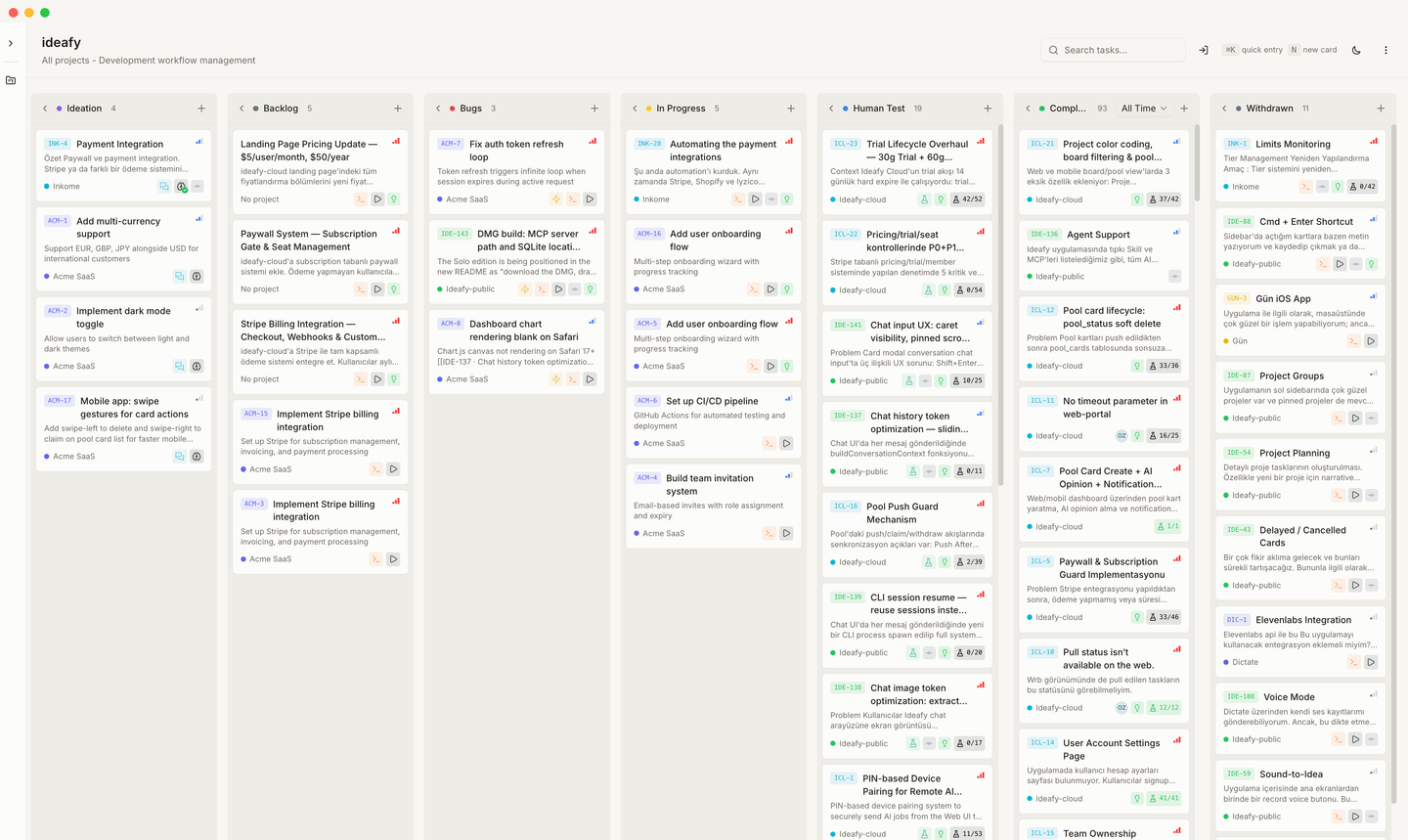
Columns
| # | Column | Internal key | What lives here |
|---|---|---|---|
| 1 | Ideation | ideation | Raw ideas, rough notes, things you want to think about before committing to scope |
| 2 | Backlog | backlog | Scoped work that's ready to be picked up. The queue |
| 3 | Bugs | bugs | Defects. Treated as a separate queue so they don't compete with feature work |
| 4 | In Progress | progress | Actively being worked on — human or AI |
| 5 | Human Test | test | Implementation is done; a human needs to verify acceptance criteria. Often the last column a non-technical teammate drives — see Tests tab |
| 6 | Completed | completed | Shipped / verified. Filtered by date (see below) |
| 7 | Withdrawn | withdrawn | Archived without shipping |
Cards move left-to-right as a rule, but drag-and-drop lets you override the flow when reality demands it.
Sort order inside a column
- Standard columns — priority (high → low), then complexity (low → high). High-priority, low-effort work rises.
- Human Test — most recently updated first, so whatever just landed for testing is at the top.
- Completed — most recent
completedAtfirst.
Completed filter
The Completed column has its own dropdown in the header:
- Today
- Yesterday
- This Week
- All
The filter looks at completedAt; if a card was moved to Completed before that field existed, it falls back to updatedAt.
How a card reaches Completed
Three ways, and none of them happen behind your back:
- Drag it there, or use the right-click Change Status submenu.
- Merge the card from the modal header — the merge lands the work on the local default branch and flips the card to Completed.
- Let the agent ask. A Claude Code session bound to a card in Human Test ticks scenarios off as it verifies them, and when the whole list is checked it asks — once, in one sentence — whether to move the card to Completed. It calls
move_cardonly on a clear yes. See the Human Test policy.
Completed doesn't mean pushed. Merging puts the commit on your local default branch. Until you push, the work has never left the machine — which is why each project row in the sidebar carries a count of unpushed commits. See Merged is not pushed.
Stale cards leave the flow
A card that stops moving doesn't just get a marker — it leaves its column's flow for a Stale row at the column's foot.
Pulling them out is what makes the rest legible. In Progress showing six cards where two have been dead for three months is a column lying about its own load, and no amount of per-card age marking fixes that: the dead cards still occupy the same six slots and the same attention.
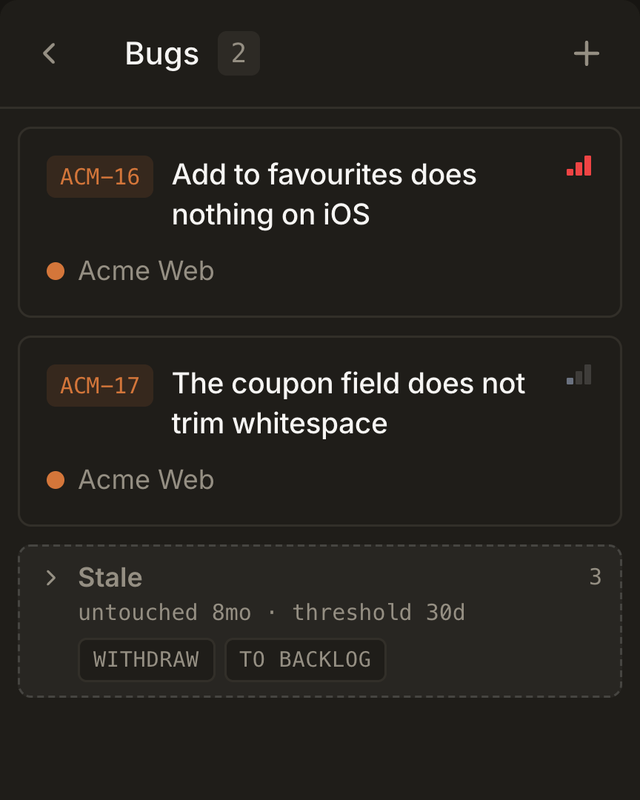
The Stale row folds through the same control as a chain — chevron, "N collapsed", per-column fold state. It leads with the oldest card's age rather than an average or the newest: the row exists to say how bad it has got, and one card untouched for eight months is the fact worth reading first.
It also carries the two bulk actions the row exists to make easy — Withdraw and To Backlog — each behind a confirmation naming how many cards it will move. (A Stale row in Backlog offers only Withdraw; there is nowhere to send them.) Withdrawn cards leave the board but are not deleted; the ones sent to Backlog rejoin at the bottom of the queue.
The threshold is per column
The number is meaningless without the column. A backlog item resting for a month is a backlog doing its job; a card waiting a month for someone to test it is a card nobody is going to test.
| Column | Default threshold |
|---|---|
| Ideation | 90 days |
| Backlog | 60 days |
| Bugs | 30 days |
| In Progress | 14 days |
| Human Test | 14 days |
| Completed / Withdrawn | never — these are done, so their age says nothing |
All five are editable: Settings → General → Stale thresholds. Only the columns you actually change are stored, so the defaults stay free to move later without migrating your settings. A value below 1 clears the override rather than being saved — a zero would sweep the whole column into its Stale row the moment it was typed.
Counted from activity, not birth
Staleness reads updatedAt, falling back to createdAt. A card opened three months ago and worked on yesterday is not stale by any reading a person would accept, and counting from creation would sweep live work into the Stale row along with the genuinely dead — turning a feature meant to surface neglect into one that hides work.
The age chip
A stale card still carries a compact age chip on its face — 5d, 3w, 7mo, 2y. Below the threshold there's no chip at all. That's the point: an age shown on every card is noise that makes the genuinely stale ones no easier to spot.
There's no louder styling for the very oldest, either. Past the threshold a card is already leaving the column's flow, so an emphasis colour would be a second voice saying the same thing. The number already separates six months from four.
Column density
Two more things keep a column readable when it fills up.
The row cap
A column renders 7 rows and then stops, with a +N more button at the foot. The count is in cards, not rows — +3 more over a hidden chain of fourteen would be a lie about what the button opens.
Uncapping is remembered per column and survives a reload, because capping is the default and what has to persist is the exception you asked for.
The WIP count
Three columns carry a soft ceiling. Where there is one, the header count reads as a fraction — 4 / 5 — and turns red once it's over.
| Column | Limit |
|---|---|
| Backlog | 15 |
| In Progress | 5 |
| Human Test | 8 |
Columns not in the table show a plain number instead; they have no meaningful ceiling, since a Backlog is allowed to be long and Completed is supposed to be. Hovering the count spells out the breakdown: 7 in flight · 2 stale · 2 over the limit of 5.
It is not a gate. Dropping a seventh card into In Progress still works — the number just turns red, which is the whole intent: the limit exists to be heard, not enforced. A number that turns red is louder than a drop the board refuses.
The count says load, not inventory: stale cards are excluded, because two dead cards should not be able to push a column over its limit and keep it there. What they are is said once, on their own row at the foot. (A collapsed column tab is answering a different question — "what's in this drawer" — so it shows the plain total, stale included.)
Empty state
An empty column shows "No tasks". While you're dragging a card, any column you hover becomes "Drop here" with a highlighted background — the UI telegraphs the drop zone so you don't have to aim.
Right-click context menu
Every card exposes a right-click menu with the fastest actions that don't need the modal:
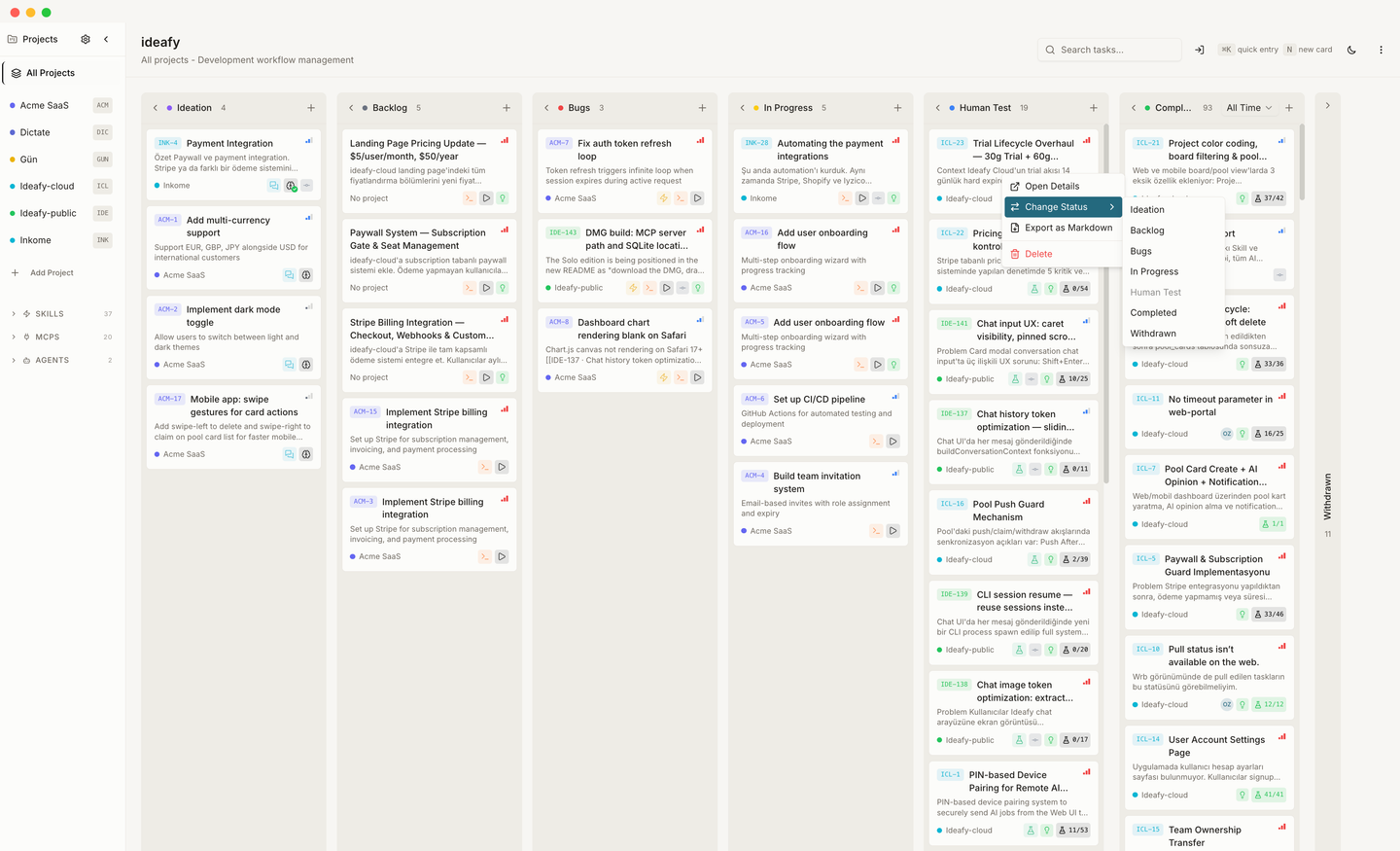
- Open Details — opens the card modal
- Change Status — submenu to move the card to any column (the current column is disabled)
- Export as Markdown — downloads the card as a
.mdfile - Send to Pool — pushes the card to the team pool (see Pool mechanics). Hidden when Supabase isn't configured or no team is active
- Delete — removes the card with a confirmation dialog
The menu is disabled while a card is locked (interactive terminal open, or a background AI process running).
Next: Board views — day/night, pool, mobile Up: User guide index