General settings
Workspace-wide settings that apply across all projects. Per-project settings live in Project settings.
Board
Two board preferences, sitting just under Appearance. Both take effect as you change them — they are not waiting on the Save Changes button at the foot of the dialog.
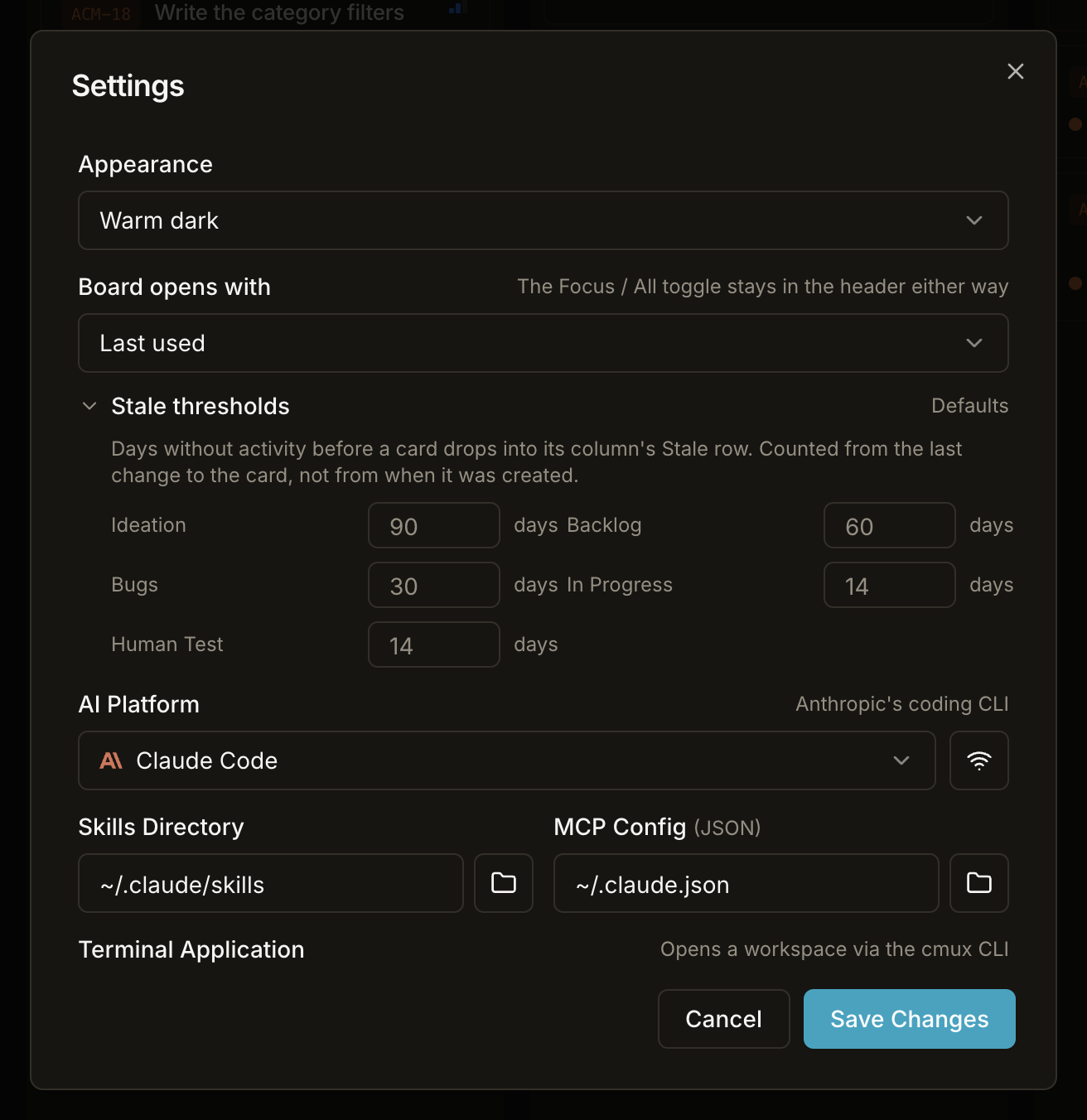
Board opens with
| Choice | On launch |
|---|---|
| Focus | Always opens in the Focus view |
| All columns | Always opens on the seven columns |
| Last used (default) | Reopens whichever view you left open |
"Last used" is there so the setting can express a habit as well as a preference. Whatever you pick, the Focus | All toggle stays in the board header — a view that hides most of the board should never be reachable only through a settings dialog, where it would be set once and forgotten.
Stale thresholds
Folded by default: five number inputs laid flat would be the largest block on this screen, for the setting on it that's changed least often. The row says Defaults or N changed so you can see at a glance whether anything is overridden.
| Column | Default |
|---|---|
| Ideation | 90 days |
| Backlog | 60 days |
| Bugs | 30 days |
| In Progress | 14 days |
| Human Test | 14 days |
Days without activity before a card drops into its column's Stale row — counted from the last change to the card, not from when it was created. Completed and Withdrawn have no threshold at all and don't appear here: they're done, so their age says nothing.
Only the columns you actually change are stored. Clearing a field restores the default, and so does anything below 1 — a zero would sweep the whole column into its Stale row the moment it was typed. See Stale cards leave the flow.
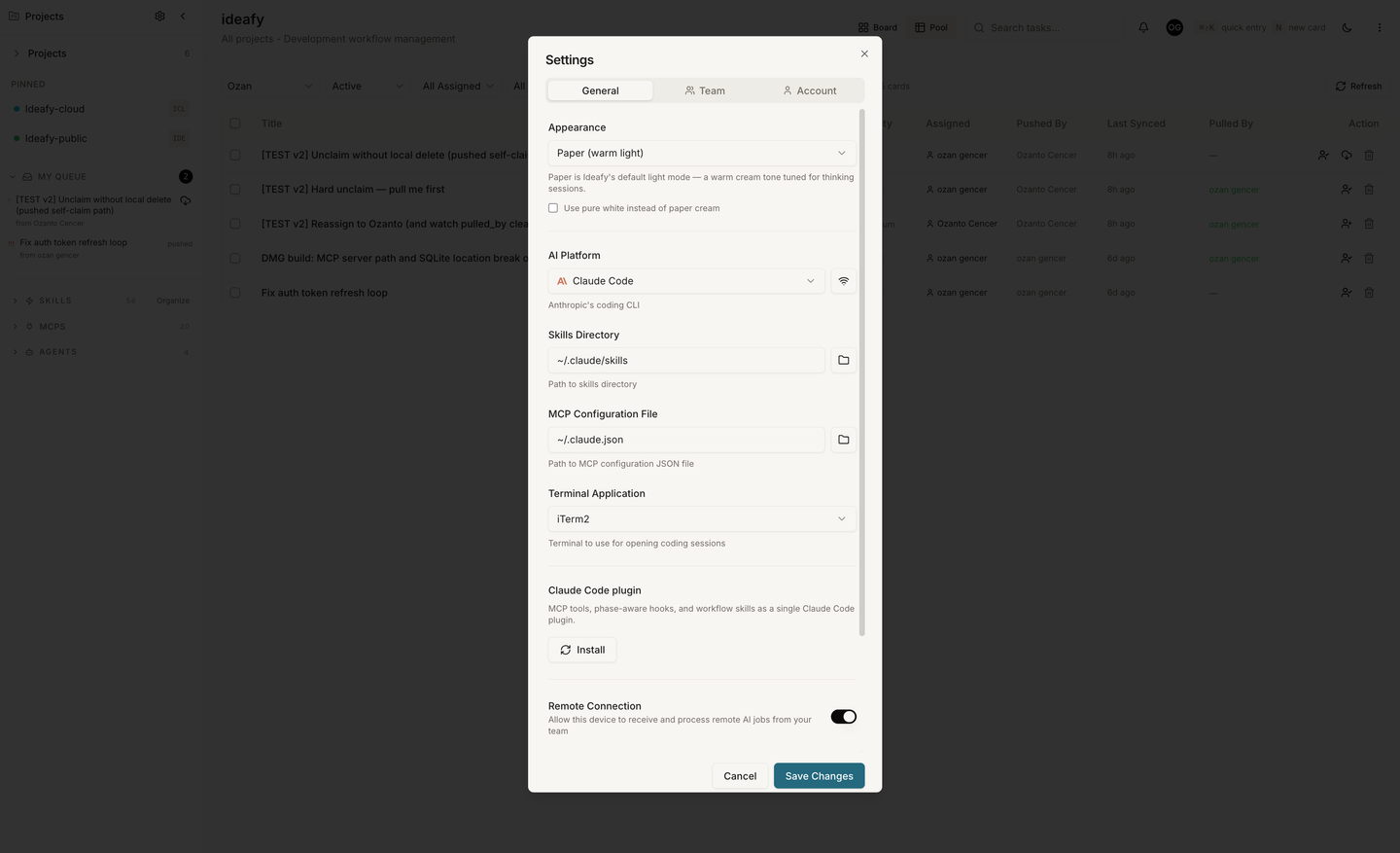
AI platform
Dropdown: Claude Code (claude) / Gemini CLI (gemini) / Codex CLI (codex) / OpenCode (opencode). Sets the default agent Ideafy spawns when starting work on a card that has no per-card override. Each platform has its own default config path and skills path; switching the dropdown updates those paths to the platform's defaults.
See Choose an AI agent for the per-card override workflow.
Skills path
The directory Ideafy looks in for skills files. Defaults by platform:
- Claude Code:
~/.claude/skills - Gemini CLI:
~/.gemini/skills - Codex CLI:
~/.codex/skills
Project-local skills in <project>/.claude/skills/ take precedence when both exist.
Ideafy uses this path to:
- Populate the
@skillmention autocomplete in card chat - Decide where to write bundled skills when you enable the Ideafy MCP & Skills toggle in a project
If you point this at a non-existent folder, Ideafy creates it on first write.
MCP config path
The file Ideafy edits to register its MCP server with the agent CLI. Defaults:
- Claude Code:
~/.claude.json - Gemini CLI:
~/.gemini/settings.json - Codex CLI:
~/.codex/config.toml
The path is per-user, not per-project. Ideafy modifies only the mcpServers.ideafy entry — your other MCP servers in the same file are preserved.
Terminal app
Which terminal emulator Ideafy spawns when you click Open in Terminal on a card. Options:
- iTerm2 (if installed)
- Ghostty (if installed)
- Terminal.app (macOS default, always available)
- Warp (if installed)
- cmux (if installed)
Auto-detection picks the first installed option. Override if you want a specific one.
cmux
cmux is driven through its CLI rather than AppleScript, which means Ideafy can place tabs deliberately instead of dropping them wherever the frontmost window happens to be.
It gets there by a longer road than the other terminals, and it's worth knowing why. cmux's CLI talks to the running app over a Unix socket that only answers processes cmux itself started — anything else is refused with "Access denied - only processes started inside cmux can connect". Ideafy launched from the Dock is exactly that "anything else", so it cannot drive cmux directly at all.
The way in is LaunchServices. cmux registers as a handler for shell scripts, so opening a script with cmux makes it run in a fresh tab, no socket involved — and cmux injects a socket capability into that tab's environment. Every run is therefore two stages: Ideafy opens a small bootstrap script, and the bootstrap, now speaking for a process cmux started, places itself and execs the real command.
Where the tab lands is a per-project choice, set in project settings. The decision itself stays on Ideafy's side: the bootstrap posts cmux's workspace list to the app, gets back one of move into this workspace / keep this one and pin it / leave it alone, and does that. Each launch also caches the workspace list, which is the only way the project settings picker can offer real workspaces to choose from — Ideafy's own process can't read them.
If anything in that chain fails, the failure is logged and nothing is thrown: you get no terminal rather than a wedged app.
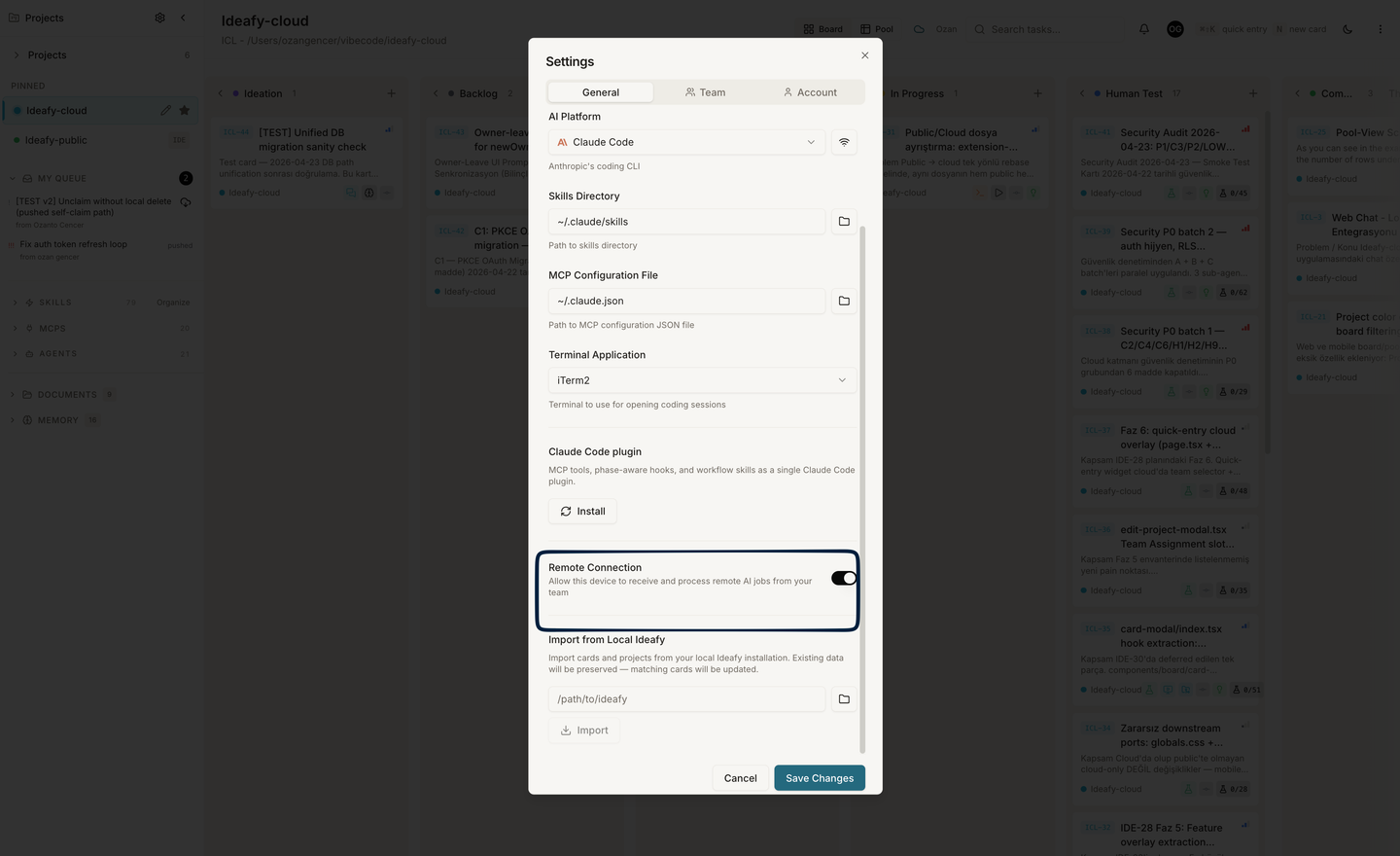
Remote connection
Toggle for the Electron remote device job listener. When on, Ideafy subscribes to ai_jobs via Supabase Realtime and the device can claim jobs dispatched from another device on the same team. Off in Public edition (feature not shipped). Opt-in on the Team edition.
See Remote device for the full workflow.
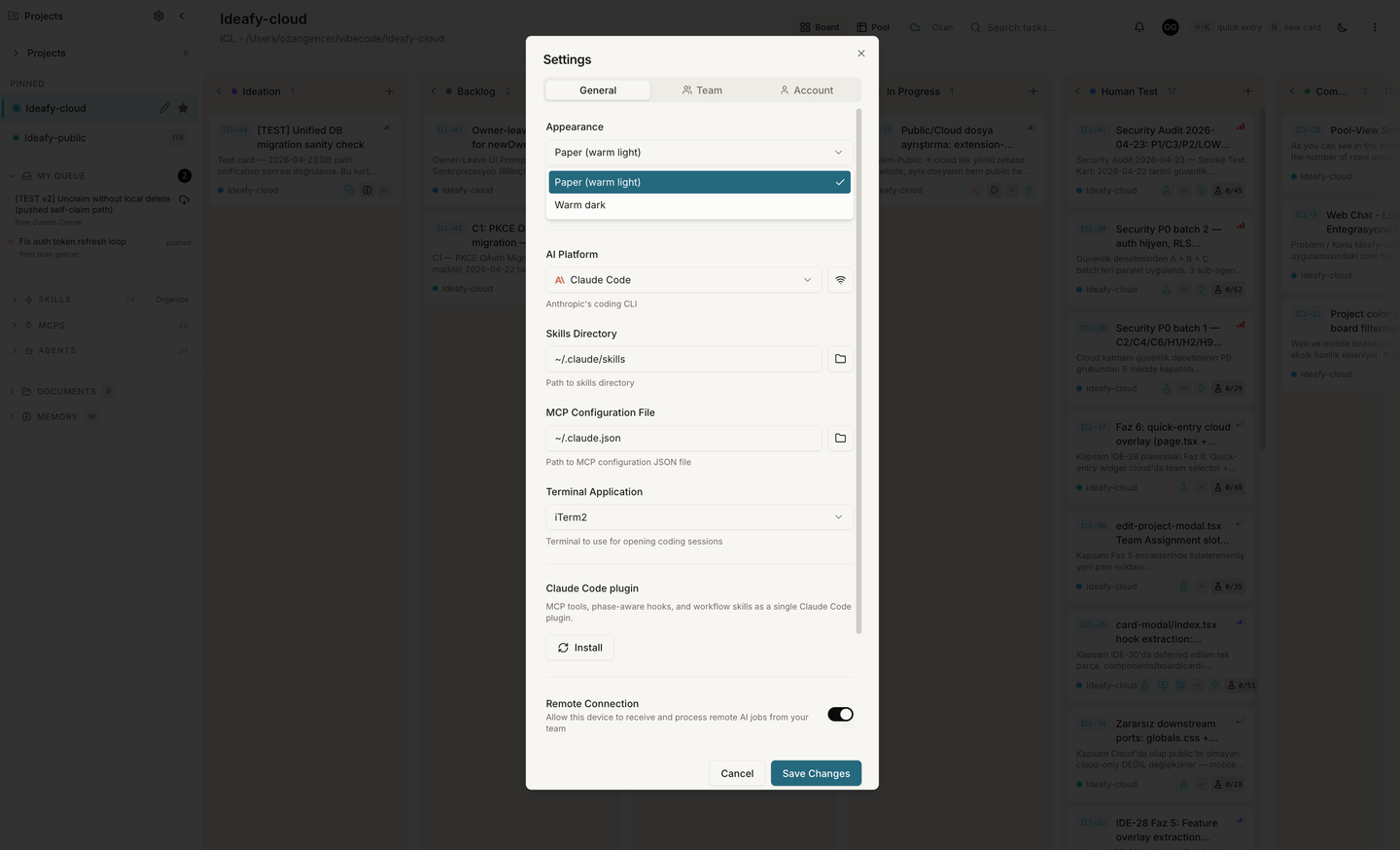
Appearance
A two-option theme picker at the top of the dialog: Paper (warm light) and Warm dark. Not a system-following toggle — you pick one, and the choice is stored per device. Change it any time; it applies immediately.
Hooks
An Install Hooks button at the bottom of the modal re-runs the phase-aware hook install across every registered project at once. Use it after an Ideafy update that ships a new hook body — existing projects pick up the newer entries without opening each project's settings.
The button only touches hooks. It does not reinstall MCP servers or bundled skills — those stay on the per-project Ideafy MCP & Skills toggle in project settings. See Bundled Claude Code hooks for what the installed hooks do.
The button only appears if the active AI platform supports hooks (Claude Code does; Gemini and Codex stubs don't yet).
Updates
Ideafy updates itself. You no longer download a fresh DMG from GitHub and drag it over the old app — the settings modal has an Updates section that checks, downloads, and installs a new version in place.
The app row walks through these states:
| State | What you see | Action available |
|---|---|---|
| Idle | v0.1.9 | Check |
| Checking | 🔄 Checking… | — |
| Newer version found | ✨ v0.2.0 available | Download |
| Downloading | Downloading… 43% (with a progress bar) | — |
| Downloaded | ✓ v0.2.0 ready | Install and Relaunch |
| Installing | 🔄 Installing… | — |
| Up to date | ✓ v0.1.9 · up to date | Check |
| Failed | ⚠ Could not check (tooltip has the error) | Retry |
Two warnings are written into the flow because both cost you work if you miss them:
- Installing restarts Ideafy. In-flight Claude sessions and background tasks stop — finish or park them before you click Install and Relaunch.
- The download is large (a couple of hundred MB). It announces itself when it finishes, because that's long enough that people switch away and would otherwise have to come back and guess.
The sidebar indicator
The mechanics above have always worked; what was missing was any reason to look at them. The old plugin badge only rendered once Settings was already open, so a stale install stayed stale.
There's now an Update chip in the sidebar that appears only when there is something to act on, and clicking it opens Settings. Its tooltip says which thing:
| Situation | Tooltip |
|---|---|
| A new app version is available | Ideafy vX.Y.Z available |
| A new version is downloaded and waiting | Ideafy vX.Y.Z ready to install |
| A new plugin version is published | Claude Code plugin vX.Y.Z available |
| The installed plugin is too old for this build | ⚠ Plugin too old for this Ideafy build — shown in the destructive colour, since this one actually breaks things |
When nothing needs attention, the chip renders nothing at all.
The Updates section also carries a Claude Code plugin row with its own Update button, so app and plugin updates read as one thing: what needs updating. Installing, enabling, and uninstalling the plugin stay on the plugin toggle below.
Claude Code plugin
Visible only when AI platform is claude. Toggle that installs the Ideafy plugin at user scope — the plugin becomes active in every project on this machine, no per-project install needed.
Install, enable, and uninstall live here; the update path lives in the Updates section above.
See Claude Code plugin for the full story — what's bundled, how install/update/uninstall work under the hood, and how user-scope interacts with project-scope.
When the platform is Codex or Gemini, this section is hidden and the equivalent install shows up in project settings instead.
Where General Settings live on disk
The AppSettings values are stored in the settings table of the local SQLite database. Back up ~/Library/Application Support/ideafy/kanban.db and you back up your settings along with everything else.
Next: Project settings Up: User guide index