Bundled Claude Code skills
Ideafy ships three skills that teach the agent how to use Ideafy's MCP tools. Skills are markdown files loaded by Claude Code (or the equivalent path for Gemini / Codex) — they're not code, just instructions the agent reads before replying.
There are two ways Ideafy's skills reach your agent today:
- Classic install — the Ideafy MCP & Skills toggle in project settings writes the three skill files into
<project>/.claude/skills/(or~/.codex/skills/,~/.gemini/skills/depending on platform). See [How skills are installed](/docs/#how-skills-are-installed) below. - Plugin install (Claude Code only) — the [Claude Code plugin](/docs/ai-and-mcp/claude-code-plugin) bundles a condensed
ideafy-workflowskill under the namespaceideafy:ideafy-workflow. No file copy needed; Claude Code reads it straight from the plugin cache. See [Plugin-sourced skills](/docs/#plugin-sourced-skills) below.
The three skills
ideafy.md — the main board interaction skill
This is the most-used skill. It instructs the agent to:
- Detect the project on every invocation using
mcp__ideafy__get_project_by_folder— stops if the agent isn't in an Ideafy-tracked folder - Parse the user's request for keywords:
list,create,update,move,plan,test,opinion,pool, etc. - Execute the matching tool with parameters inferred from natural language
- Report back with display IDs (e.g.,
KAN-42), titles, and any status transition that occurred
The skill enforces the display ID format ({prefix}-{taskNumber}) everywhere so you and the agent are always speaking the same card language.
human-test.md — card creation from a conversation
This skill is for the common flow where you've just had a conversation with the agent about a feature and you want to turn that conversation into a card, ready to test.
The skill extracts:
- Title
- Description (what the feature is)
- Solution (how it was implemented)
- Test scenarios, as checkbox lists grouped under
### Happy Path,### Edge Cases, and similar H3 headings
It creates the card in progress status, then immediately calls save_tests to move it to Human Test. You end up with a populated card and a ticked-off solution tab, and the board reflects it in one round trip.
product-narrative.md — the narrative interview
The narrative interview is a seven-question flow that generates docs/product-narrative.md (or the path you configured). Questions cover story, problem, target users, core features, non-goals, tech stack, and success metrics. Before asking, the agent scans package.json, the README, and the top-level folder structure to ground its questions in your actual project.
The output is a markdown file with these sections, which the agent then loads as context for every evaluate run. See Your first project for the user-facing walkthrough.
How skills are installed
Enable the Ideafy MCP & Skills toggle in the project settings modal. This installs skills alongside the MCP server and hooks in one step — see MCP & Skills installation. Under the hood the toggle hits POST /api/projects/[id]/skills, which copies the three skill files into the project's .claude/skills/ directory (or ~/.codex/skills/, ~/.gemini/skills/ for those platforms).
You can verify via GET /api/projects/[id]/skills, which returns { installed: boolean }. You can remove them via DELETE.
The paths can be moved — Settings → General → Skills Path controls where Ideafy looks. The default is ~/.claude/skills (global) for Claude Code, or per-platform for Gemini/Codex. Project-local .claude/skills/ takes precedence when both exist.
Note that on Claude Code the classic toggle is hidden in favour of the Claude Code plugin toggle — the plugin delivers the equivalent skill (plus MCP and hooks) in one package. The Ideafy MCP & Skills toggle is what Codex and Gemini users see instead.
Plugin-sourced skills
When the Claude Code plugin is enabled, its bundled skills appear in the sidebar Skills panel namespaced by the plugin key. Today that's one entry:
ideafy:ideafy-workflow— a condensed version ofideafy.mdthat covers the same card-create / bind / phase flow
The namespace prefix (ideafy:) is what keeps plugin skills from colliding with skills of the same short name installed the classic way. Claude Code exposes the namespaced form both in the sidebar and in the /<skill> autocomplete.
Plugin skills are discovered by reading ~/.claude/plugins/installed_plugins.json and walking the install cache for each enabled entry. Disabled plugins are skipped. Project scope plugin skills are only shown when the matching project is active; user scope plugin skills show in every project.
No file lives under ~/.claude/skills/ for plugin skills — they're read from the plugin cache directly. Moving or editing your Skills Path does not affect them.
Using skills from the card chat
In the card modal chat, type @skill and an autocomplete appears with all skills the agent can see — including the three bundled ones plus any you've added yourself. Pick one and the agent will load and apply it for the current turn.
See Card chat & mentions for the mention mechanism.
Organizing skills into groups
Once you install more than a handful of skills, the sidebar list gets long. Ideafy lets you collect related skills into named groups — without editing any skill files. Groups are a pure sidebar organization layer; they don't move files on disk or change how Claude loads a skill.
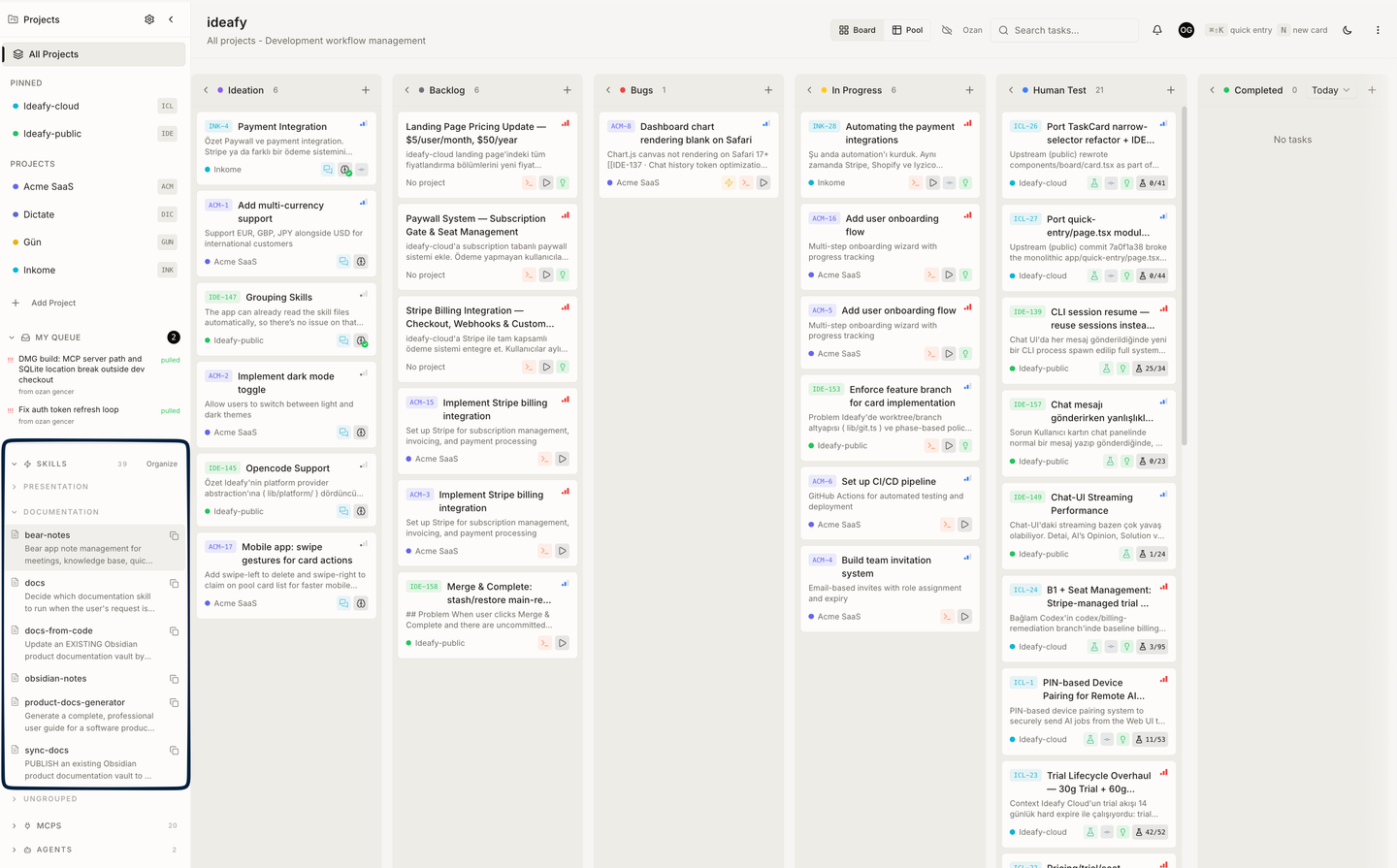
Where groups live
The Skills section in the sidebar has an Organize button next to the header. Click it to enter organize mode; click Done to leave.
In organize mode you can:
- Create a new group — at global scope (applies to every project) or project scope (only visible when the current project is active)
- Rename or delete a group — via the pencil / trash icons next to the group header
- Move a skill into a group — via the arrow popover next to each skill; it lists existing groups in that scope and offers a
+ New Groupshortcut - Move a skill back to Ungrouped — same popover, "None" option
Skills that don't belong to any group collapse under a single Ungrouped header at the bottom of the list. Groups are collapsible too — each group's open/closed state is remembered per session.
Scope: global vs project
| Scope | Shown when | Best for |
|---|---|---|
| Global | Always, in every project | Workflow skills you use everywhere — /ideafy, /human-test, /frontend-design |
| Project | Only when that project is active | Domain-specific skills — /hana-sql-artifact for the SAP project, /remotion-best-practices for a video project |
A skill can only live in one group per scope. Moving it to a new group removes it from its previous group automatically.
Persistence
Skill groups are stored in the local SQLite database (skill_groups and skill_group_items tables), so they survive restarts. They're included in the Backup → Export bundle and restored by Backup → Import. Team edition does not sync groups to the pool — each teammate keeps their own layout.
Groups in the / menu
When you type / in a card chat, groups appear as top-level entries in the unified picker, each showing a count ("3 skills"). Expand a group to pick a specific skill, or pick the group itself to let the agent see all the skills inside it in one turn.
Writing your own skill
A skill is just a markdown file with YAML frontmatter:
---
name: my-skill
version: 1.0.0
description: What this skill does
---

# Instructions the agent will follow

...
Drop it into ~/.claude/skills/ (or the path you configured) and it's available via @skill. No restart required for new files in most agent CLIs — check your platform's behaviour if it doesn't show up.
Skills are an open-ended extension point. The three bundled ones are a starting point for common Ideafy operations, not an exhaustive list of what you can do.
Prev: Claude Code plugin Next: Bundled Claude Code hooks Up: User guide index