Claude Code plugin
Claude Code has a native plugin system — a distribution format that bundles MCP servers, hooks, skills, agents, and slash commands into a single versioned package. Ideafy ships its integration as a plugin so every Claude Code user can wire up the full Ideafy stack (MCP + phase-aware hooks + skills) with one click, without editing config files or knowing paths.
The plugin is the preferred install path for Claude Code. For Codex and Gemini users, the classic Ideafy MCP & Skills toggle still applies — plugins are a Claude-Code-only concept.
What's inside the plugin
One git repo, one versioned package:
| Component | What it provides |
|---|---|
| MCP server | All 15 tools from [Ideafy's MCP server](/docs/ai-and-mcp/ideafy-mcp-server), compiled to a portable node mcp/index.js entry |
| Hooks | UserPromptSubmit (phase-aware policy, creation offers, offline reminder), PreToolUse (branch enforcement) and PostToolUse on ExitPlanMode (plan sync). Same behaviour as the hooks described in [Bundled Claude Code hooks](/docs/ai-and-mcp/ideafy-hooks) |
| Skills | ideafy-workflow — a condensed version of the ideafy.md skill, exposed under the namespaced handle ideafy:ideafy-workflow |
Future plugin versions can add agents, slash commands, and extra skills without touching anything on your side.
Install from the Ideafy UI
The plugin install is surfaced as a toggle, gated by the active AI platform. Only Claude Code users see it:
- Global (user scope) — Settings → General → Claude Code plugin. When on, the plugin is enabled for every project on this machine.
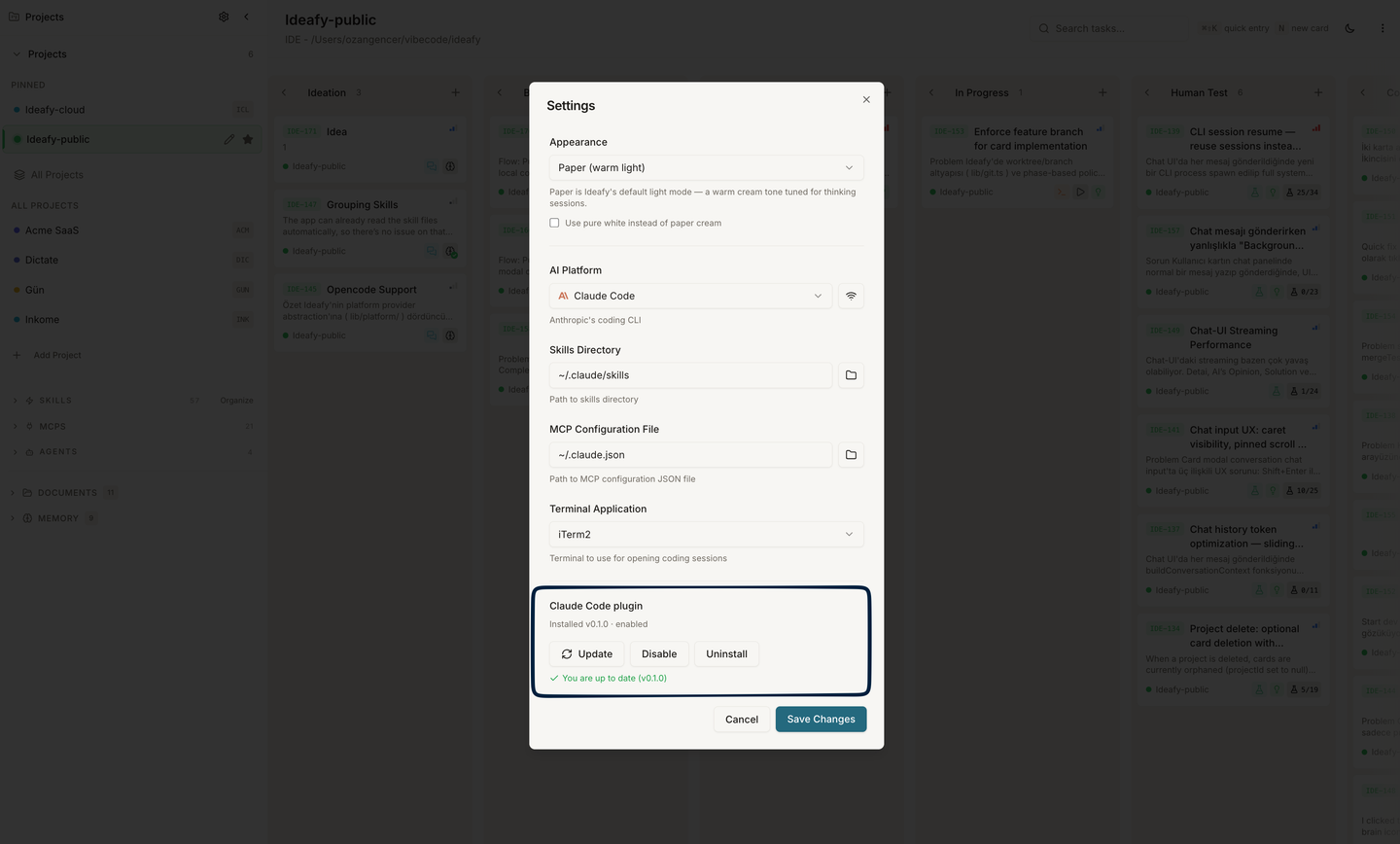
- Project scope — Edit Project dialog → Claude Code plugin. When on, the plugin is enabled only when that project is active. If the user-scope toggle is already on, the project row shows Inherited instead and no per-project switch is needed.
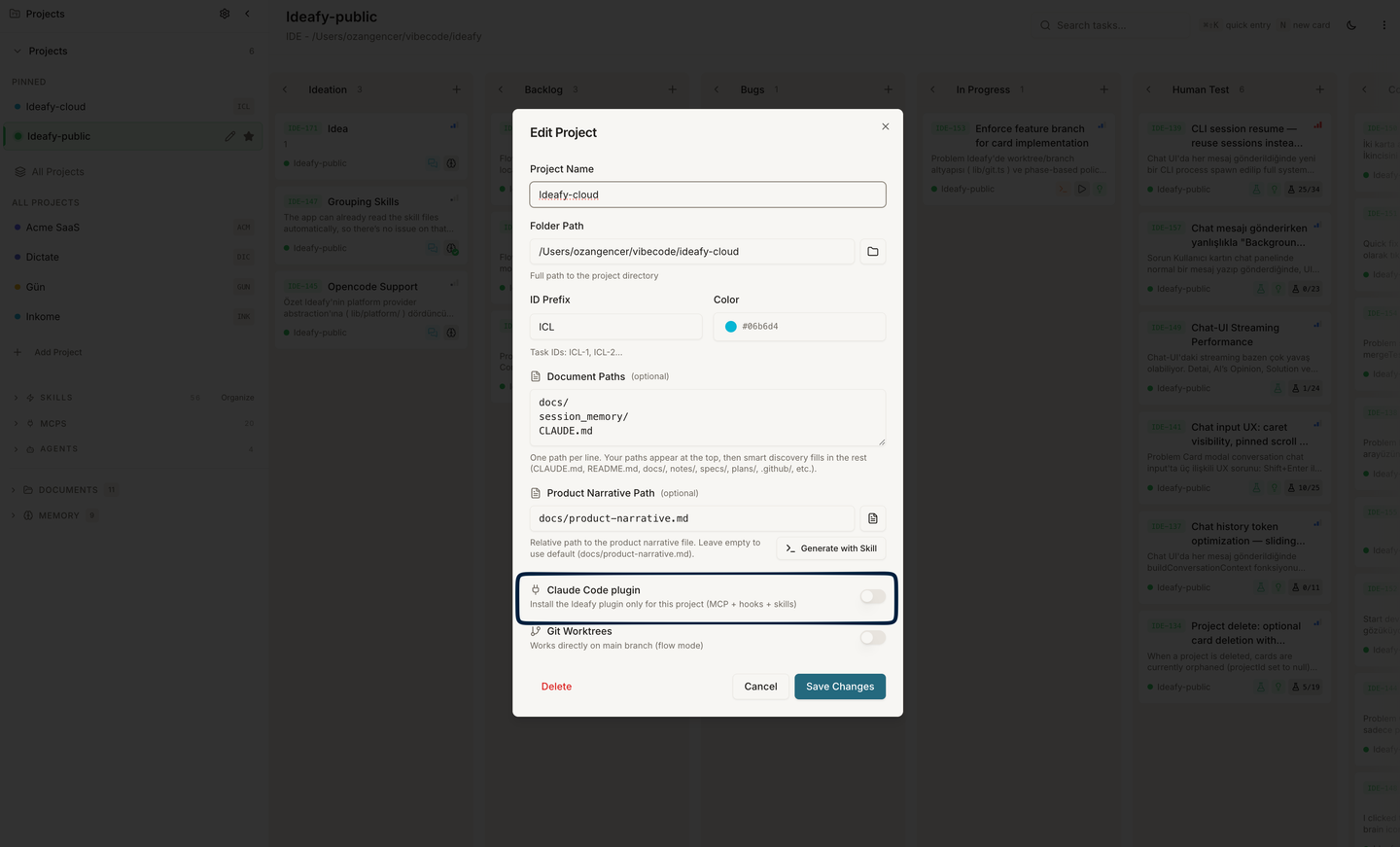
Flipping the toggle on runs a one-shot install that:
- Clones (or fast-fetches) the marketplace repo into
~/.claude/plugins/marketplaces/ideafy/ - Reads the plugin version, copies the plugin directory into
~/.claude/plugins/cache/ideafy/ideafy/<version>/ - Runs
npm ci --omit=devinside that cache dir sobetter-sqlite3's prebuilt native binary is fetched for your platform - Merges three JSON files atomically:
known_marketplaces.json,installed_plugins.json, and the appropriatesettings.json(user or project scope) — your existing plugins and settings are preserved
The whole flow takes ~15 seconds on a cold install. Subsequent updates reuse the cached clone and are faster.
Flipping the toggle off runs the reverse: the scope-specific entry is removed from installed_plugins.json, the enabledPlugins flag is dropped, and the cache is only deleted when no scope has the plugin anymore (so disabling project scope while user scope is on leaves the shared cache alone).
Install from the Claude Code CLI
For developers who prefer the CLI, the plugin is also on a public marketplace:
/plugin marketplace add ozangencer/ideafy-claude-plugin
/plugin install ideafy@ideafy
Restart Claude Code after install. The marketplace entry lands in known_marketplaces.json, the plugin lands in the same ~/.claude/plugins/cache/ideafy/ideafy/<version>/ directory, and the enabledPlugins flag is set in ~/.claude/settings.json. From there, the Ideafy UI sees the install via its own status check and reflects it in the toggle.
Update flow
A small badge under the toggle tells you whether the install is current. It has four visible states:
| State | What it means |
|---|---|
| Checking for updates… | Fetching the manifest from GitHub (~500 ms) |
| You are up to date (v0.1.0) | The installed version matches the latest published on the marketplace |
| v0.2.0 available — click Update to pull it in | A newer version has been published; the Update button runs the install flow against it |
| Could not check for updates | Network fetch failed (offline, GitHub hiccup) — tooltip holds the error |
The check hits raw.githubusercontent.com directly for the plugin manifest — no git clone, no auth. The Update button re-runs the full install flow described above, which is idempotent: same cache path structure, new version folder, stale entries in installed_plugins.json replaced.
Plugin vs "Ideafy MCP & Skills" — which toggle do I see?
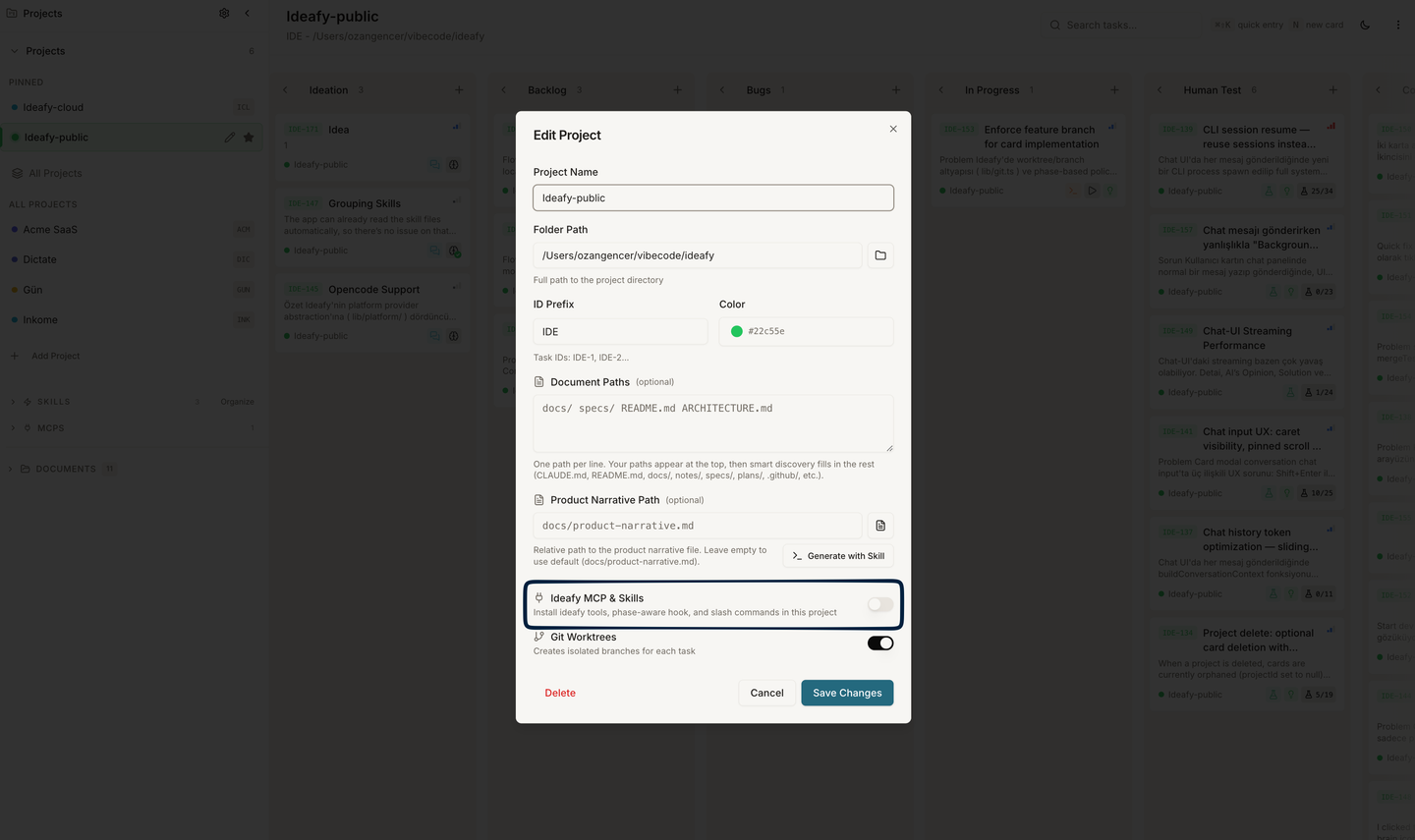
The Edit Project dialog picks one or the other based on the active AI platform:
| Platform | Toggle shown | Why |
|---|---|---|
| Claude Code | Claude Code plugin | Plugin system handles everything in one package |
| Gemini CLI | Ideafy MCP & Skills | No plugin system on Gemini — classic path-based install writes ~/.gemini/settings.json and ~/.gemini/skills/ |
| Codex CLI | Ideafy MCP & Skills | Same — writes .codex/config.toml and ~/.codex/skills/ |
You never see both toggles at once. Switching platforms (Settings → General → AI platform) swaps which toggle the dialog renders.
Sidebar visibility
When the plugin is enabled, its resources show up in the sidebar alongside globally-installed ones. They're namespaced so there's no collision with the classic install:
- Skills section lists
ideafy:ideafy-workflowas its own entry - MCPS section lists the plugin's MCP server
- Agents section lists anything the plugin ships (none today)
Project-scope plugin installs only appear in the sidebar when the matching project is active. User-scope installs show everywhere. See Plugin-sourced skills for the Skills panel detail.
Distribution internals
The plugin repo lives at github.com/ozangencer/ideafy-claude-plugin, laid out as a Claude Code marketplace (marketplace.json at the root, plugins/ideafy/ as the actual plugin directory). Claude Code resolves paths through ${CLAUDE_PLUGIN_ROOT} so nothing is hard-coded to a specific user's machine — the MCP server entry in the plugin's .mcp.json is literally:
{
  "mcpServers": {
    "ideafy": {
      "command": "node",
      "args": ["${CLAUDE_PLUGIN_ROOT}/mcp/index.js"]
    }
  }
}
${CLAUDE_PLUGIN_ROOT} expands to the per-install cache path at runtime. Same trick drives the hook scripts under hooks/.
The MCP server's SQLite database path is resolved cross-platform through the helper documented in Database path. On macOS, Linux, and Windows the plugin MCP and the Ideafy app talk to the same kanban.db file, so cards you create in the UI appear immediately when Claude Code calls mcp__ideafy__list_cards.
Removing the plugin
Flip the Ideafy toggle off, or run /plugin uninstall ideafy@ideafy in Claude Code. Either approach removes the install entry and clears enabledPlugins. Claude Code picks up the removal on next restart.
If you ever need to wipe the cache manually:
rm -rf ~/.claude/plugins/cache/ideafy
rm -rf ~/.claude/plugins/marketplaces/ideafy
Then edit ~/.claude/plugins/installed_plugins.json and ~/.claude/settings.json to remove the ideafy@ideafy entries. The Ideafy UI syncs its status from those files on next open.
Coexistence with the classic install
If you used the old Ideafy MCP & Skills toggle on a project before switching to the plugin, the two can coexist briefly — both register an ideafy MCP server (classic into the project's .claude/settings.json, plugin into the plugin's own .mcp.json). Claude Code complains about the name collision and only loads one.
The clean transition is:
- On the Claude project, turn Ideafy MCP & Skills off (removes the project-level
.claude/settings.jsonentries) - Turn Claude Code plugin on (global or project scope, your call)
- Restart Claude Code
Existing Codex / Gemini project installs are not affected — their configs live under .codex/ and .gemini/ and the plugin doesn't touch those paths.
Prev: Ideafy's MCP server Next: Bundled Claude Code skills Up: User guide index